3D Painting in Procreate Mastery
Paint 3D models in Procreate, in under 7 hours.
- 6.7hHD video
- 34lessons
- 23+brushes
- Beginnerlevel
One-time purchase · Lifetime course access · 30-day money-back
Learn Procreate's 3D tools, materials and lighting so you can paint textured models on your own. Over 80,000 Twotap students have used our courses to build real skills, and this one is built the same way: calm, specific, step by step.
- An iPadAny model that runs Procreate
- Apple PencilOr a compatible stylus
- ProcreateA one-time app purchase
From flat models to painted surfaces you can control
Whether you're new to drawing or already illustrating, we start with the basics and build toward more complex materials and lighting.
What helps most in 3D painting is knowing which brushes to use, how light hits a surface, and how Procreate's 3D tools actually behave. We walk through brushes, shading, materials and the 3D panel without rushing.
With almost 7 hours of video, this course runs longer than most short tutorials, with calm narration so you can paint along without feeling lost.
Faster, more detailed, and cheaper than a physical studio
A basic set of brushes, paints and paper can cost $250+. With Procreate, your studio fits on your iPad.

No extra equipment
No paints, scanner or desktop setup. Work wherever you have your iPad, including short sessions on the go.

Mistakes stay temporary
Undo, adjust layers and test finishes until the texture and highlights look right.

Zoom for precision
Zoom in to paint petals, cracked ceramic and metal edges with control you rarely get on physical surfaces.
You'll learn by doing
Almost every lesson gives you a result you can see on your canvas. And because you keep lifetime access, you can go at your own pace without pressure.

Week 1
By the end of Week 1, you'll have your first finished 3D piece.

Month 2
Get brushes built for this course so your strokes match the lessons.

Today
Discover the perfect brushes to bring your artistic vision to life with ease and precision.

Month 1
By the end of Month 1, you'll have a 3D style you're proud of.

Month 3
Add a full collection of premium 3D materials and textures.
Today
Discover the perfect brushes to bring your artistic vision to life with ease and precision.
Week 1
By the end of Week 1, you'll have your first finished 3D piece.
Month 1
By the end of Month 1, you'll have a 3D style you're proud of.
Month 2
Get brushes built for this course so your strokes match the lessons.
Month 3
Add a full collection of premium 3D materials and textures.
Paint 5 complete 3D vase exercises
Apply everything you learn by painting five gallery-worthy botanical vases from base colours to finished flowers.

Wave Vase with Peony
Paint a wave vase with an abstract design and gold-spray finish, then bring the peony flower and its leaves to life.

Glitter Scallop Vase with Citrus
Create a glitter-finished vase, then paint vibrant citrus fruits, flowers and leaves to complete the design.

Melted Marble Vase with Poppies
Build a melted-marble vase with a cracked ceramic texture, then paint poppy flowers and their stems.

Terrazzo Donut Vase with Lily
Design a terrazzo-textured donut vase, then paint a lily flower along with its leaves.

Antique Marble Vase with Auricula
Create an antique vase with a pink-and-blue marble finish, then paint delicate auricula flowers and leaves.
Your mentor
For over 15 years I've been doing illustrations for brands like Louis Vuitton, Tiffany & Co. and Sephora
I'm Freya Kotchakorn. My digital illustrations have been used by Louis Vuitton, Tiffany & Co., and Sephora, and I've spoken at Apple Store events to teach Procreate techniques.
Yet my favorite work isn't for big brands, it's helping complete beginners surprise themselves with what they can create. My favorite feedback is when they tell me: "It felt very geared towards beginners wanting to learn Procreate... it felt like it was attainable even for someone like me who has very little experience."
That's exactly what I designed this course to do. Make the "impossible" feel completely achievable.


Speaking at an Apple Store event about Procreate techniques
Everything you'll be able to do by the end
We start from the beginning and build toward confident 3D painting, so you can finish models without guessing.
Set up your workspace: configure Procreate and learn the tools you'll use throughout.
Use the 3D tools: import models, control lighting and environment, and view your work in AR.
Build your own brushes: work with colour, roughness and metallic settings to make material and texture brushes.
Paint light and shading: use light and shadow so finishes feel dimensional.
Work faster: pick up shortcuts and habits that usually take years of trial and error.
All the tools, just a few clicks away
Brushes wear out and watercolors don't come in endless supplies, every so often you splurge another $100 just to keep painting. In Procreate, everything is right there whenever you need it.
By hand, you need a dedicated space large enough to take up half a room. With Procreate, all you need is your iPad and Apple Pencil, so you're free to create wherever you please.
Practice makes perfect. We've built in five hands-on exercises so you don't just watch, you finish the course with five pieces of your own 3D art to show off or sell.


Bonuses included with enrollment
Lifetime access to six extras that support the lessons and your next 3D pieces.

Free bonus #1
5 botanical 3D models

Free bonus #2
A pack of material brushes
Free bonus #3
2024 update bonus

Free bonus #4
Source files for every design

Free bonus #5
Downloadable colour swatches

Free bonus #6
Private Twotap community
Free Bonus #1
5 botanical 3D models
5 botanical 3D models compatible with Procreate, including a commercial license so you can use them in your own work.
Free Bonus #2
A pack of material brushes
16 material brushes plus the 7 material brushes you create in the lessons, 23 in total.
Free Bonus #3
2024 update bonus
8 animal-skin texture brushes for your 3D models, added in a course update.
Free Bonus #4
Source files for every design
Procreate source files for every lesson so you can inspect layers and learn faster.
Free Bonus #5
Downloadable colour swatches
Colour palettes for every exercise as downloadable swatches you can reuse later.
Free Bonus #6
Private Twotap community
Free lifetime membership to our private Facebook community of 23,000+ artists. Share work and get feedback from Twotap, the team and fellow students.
8 modules, 36 lessons, 7 hours
Click any module to expand the lesson list. All lessons are narrated in English with English subtitles available.
Meet your instructor, learn the lesson platform, and get access to our private artists-only Facebook community.
 Lesson 1: Welcome to the Course6:55
- Lesson 2: Access to Facebook Private Group
- Lesson 3: Download the Files
Get to know Procreate's 3D tools, from importing models to lighting, augmented reality, exporting and preparing showcases for social media.
 Lesson 4: Importing 3D Models / Layout of 3D Layers / Gestures and Tools8:23
 Lesson 5: Viewing in 2D, 3D, or Reference Window2:01
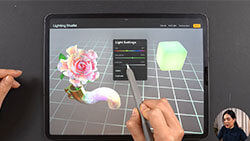 Lesson 6: Lighting & Environment11:52
 Lesson 7: Viewing in Augmented Reality (AR)3:02
 Lesson 8: Sharing / Exporting 3D Models / Sharing Textures3:24
 Lesson 9: Preparing a Model Showcase for Social Media5:55
Bring your models to life with colour, roughness and metallic settings, and learn to build your own material and texture brushes.
 Lesson 10: How the Color, Roughness, and Metallic Settings Work7:03
 Lesson 11: How Material Brushes Work4:25
 Lesson 12: How to Create Material Brushes4:25
 Lesson 13: How to Create Texture Brushes8:25
Paint a wave vase with an abstract design and gold-spray finish, then bring the peony flower and its leaves to life.
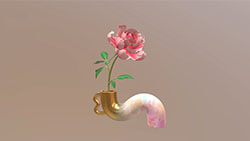 Lesson 14: Filling the Base Colors4:47
 Lesson 15: Vase (Part 1), Painting an Abstract Design4:58
 Lesson 16: Vase (Part 2), Giving it a Gold-spray Finish8:54
- Lesson 17: Peony (Part 1), Painting the Peony Flower45:23
 Lesson 18: Peony (Part 2), Painting the Leaves16:06
Create a glitter-finished vase, then paint vibrant citrus fruits, flowers and leaves to complete the design.
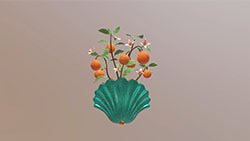 Lesson 19: Filling the Base Colors3:20
 Lesson 20: Vase, Creating a Glitter Finish11:02
 Lesson 21: Painting the Citrus Fruits9:09
 Lesson 22: Painting the Flowers9:06
 Lesson 23: Painting the Leaves22:16
Create a melted-marble vase with a cracked ceramic texture, then paint poppy flowers and their stems.
 Lesson 24: Filling in the Base Colors3:20
 Lesson 25: Vase (Part 1), Painting an Abstract 'Melted Marble' Design10:46
 Lesson 26: Vase (Part 2), Adding a 'Cracked Ceramic' Texture Finish4:12
 Lesson 27: Painting the Poppy Flowers20:23
 Lesson 28: Painting the Stems10:41
Design a terrazzo-textured donut vase, then paint a lily flower along with its leaves.
- Lesson 29: Filling in the Base Colors16:37
 Lesson 30: Vase, Creating a Terrazzo Multi-texture Finish13:58
 Lesson 31: Painting the Lily Flower38:08
- Lesson 32: Painting the Leaves21:04
Create an antique vase with a pink-and-blue marble finish, then paint delicate auricula flowers and their leaves.
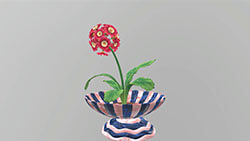 Lesson 33: Filling the Base Colors16:03
- Lesson 34: Vase, Create a Dual-Layer Pink & Blue Marble Finish9:37
 Lesson 35: Painting the Auricula Flowers12:30
- Lesson 36: Painting the Leaves20:11

30-day money-back guarantee
You get a full 30 days to try the course. If it isn't the right fit, email support@twotap.art and we'll refund every cent, including credit card processing fees. No questions asked.
 Lifetime access and updates
- Paint 5 complete 3D pieces of your own
- 5 botanical 3D models + 23 material brushes
- 30-day money back guarantee
3D Painting in Procreate Mastery
8 Modules, 36 Lessons, 7 Hours of in-depth video lectures
Everything you get today
- 3D Painting in Procreate Mastery8 Modules, 36 Lessons, 7 Hours of in-depth video lectures$699
- 5 botanical 3D models
- A pack of material brushes
- 2024 update bonus
- Source files for every design
- Downloadable colour swatches
- Private Twotap community
One-time purchase · Lifetime course access
 Secure payment


*Prices in USD. One-time purchase with lifetime course access.
FAQs
Find answers to common questions about this and other Twotap courses
No. We start from the very beginning and never assume you've drawn before. If you can hold an Apple Pencil and have Procreate on your iPad, you can follow along.
Any iPad from 2018 onward runs Procreate well. You don't need the newest model, a solid Apple Pencil, compatible iPad is enough.
Yes, Procreate works best with a pressure-sensitive Apple Pencil (1st Gen, 2nd Gen, or Pro). The basic USB-C Pencil is less ideal for line weight and opacity.
The videos total about 7 hours. Most Twotap students spend a bit longer drawing along, and that's the point. Lifetime access means you can go at your own pace. A lot of people fit this into about 30 minutes a day.
You can watch on any device with a browser, but you'll want your iPad open to draw along. Many students watch a step, pause, then paint, or use a second screen for the video.
You're not alone. Join the private Twotap community on Facebook to ask questions and share progress, students and our team are active there. You can also email support@twotap.art anytime.
No. This is a one-time purchase with lifetime access. Buy once, revisit forever, including updates we add to the course.
Yes. We offer a 30-day money-back guarantee. If it isn't the right fit, reach out to support@twotap.art within 30 days and we'll take care of a full refund.
Procreate's 3D tools are part of the standard Procreate app on iPad, no separate purchase needed beyond Procreate itself.
Yes. You get 5 botanical 3D models with a commercial license, 23 material brushes, 8 animal-skin texture brushes, colour swatches and source files, all yours to keep.
Still have questions?
We're happy to help, whether it's a tech hiccup, a sizing question, or you're just not sure which Twotap course fits. Reach out anytime.
Contact